Adafruit TPL5111 Low Power Timer Breakout
Adafruit TPL5111 Low Power Timer Breakout
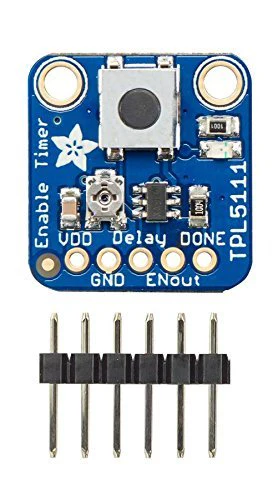
With some development boards, low power usage is an afterthought. Especially when price and usability are the main selling points. So what should you do when it's time to turn around and make that project of yours run on a battery or solar? Sure you could try to hot air that regulator off, or you could Jerry Rig A relay. Or, use a 555? Ugh, the options aren't that great.The Adafruit TPL5111 reset allows you timer is a stand-alone breakout that will turn any electronics into low power electronics. It will take care of enabling and disabling your electronics using a built in timer that can vary from once every 100ms up to once every two hours. Basically, the TPL will set an enable pin high periodically, adjustable by potentiometer or resistor, and turn on your project's power. It will then wait until a signal is received from the project to tell the TPL that it can safely disable the project by setting the enable pin Low.We also have a TPL5110 breakout, which rather than a setting to enable pin high/low, connects and disconnects power. The TPL5111 breakout is best when you have an enable pin you can control, the TPL5110 is best when you are able to 'break' the power input line to place the TPL5110 between the power supply and Vin.Usage is easy. First, set your desired Delay but adjusting the on-board trim pot: All the way to the left is once-per-100ms and all the way to the right is once every 2 hours. Then, connect VDD up to your 3 5 V project power supply, and then your project's enable pin to the enable pin. Finally, select a signal pin from your project to the done pin. In your project's code or design, just make sure that it sets the pin high done once it is completed with its task. That's it.While the TPL5111 is running/but the remainder of the project is the marriage of powered) the current draw is about 20uA (according to our Monsoon Power Meters).If you want to turn the device on by hand, you can also activate the TPL by pressing the onboard T
Product Features
Adafruit TPL5111 Low Power Timer Breakout
Adafruit TPL5111 Low Power Timer Breakout
With some development boards, low power usage is an afterthought. Especially when price and usability are the main selling points. So what should you do when it's time to turn around and make that project of yours run on a battery or solar? Sure you could try to hot air that regulator off, or you could Jerry Rig A relay. Or, use a 555? Ugh, the options aren't that great.The Adafruit TPL5111 reset allows you timer is a stand-alone breakout that will turn any electronics into low power electronics. It will take care of enabling and disabling your electronics using a built in timer that can vary from once every 100ms up to once every two hours. Basically, the TPL will set an enable pin high periodically, adjustable by potentiometer or resistor, and turn on your project's power. It will then wait until a signal is received from the project to tell the TPL that it can safely disable the project by setting the enable pin Low.We also have a TPL5110 breakout, which rather than a setting to enable pin high/low, connects and disconnects power. The TPL5111 breakout is best when you have an enable pin you can control, the TPL5110 is best when you are able to 'break' the power input line to place the TPL5110 between the power supply and Vin.Usage is easy. First, set your desired Delay but adjusting the on-board trim pot: All the way to the left is once-per-100ms and all the way to the right is once every 2 hours. Then, connect VDD up to your 3 5 V project power supply, and then your project's enable pin to the enable pin. Finally, select a signal pin from your project to the done pin. In your project's code or design, just make sure that it sets the pin high done once it is completed with its task. That's it.While the TPL5111 is running/but the remainder of the project is the marriage of powered) the current draw is about 20uA (according to our Monsoon Power Meters).If you want to turn the device on by hand, you can also activate the TPL by pressing the onboard T
Product Features
Product Information
Product Information
Shipping & Returns
Shipping & Returns
Description
Adafruit TPL5111 Low Power Timer Breakout
With some development boards, low power usage is an afterthought. Especially when price and usability are the main selling points. So what should you do when it's time to turn around and make that project of yours run on a battery or solar? Sure you could try to hot air that regulator off, or you could Jerry Rig A relay. Or, use a 555? Ugh, the options aren't that great.The Adafruit TPL5111 reset allows you timer is a stand-alone breakout that will turn any electronics into low power electronics. It will take care of enabling and disabling your electronics using a built in timer that can vary from once every 100ms up to once every two hours. Basically, the TPL will set an enable pin high periodically, adjustable by potentiometer or resistor, and turn on your project's power. It will then wait until a signal is received from the project to tell the TPL that it can safely disable the project by setting the enable pin Low.We also have a TPL5110 breakout, which rather than a setting to enable pin high/low, connects and disconnects power. The TPL5111 breakout is best when you have an enable pin you can control, the TPL5110 is best when you are able to 'break' the power input line to place the TPL5110 between the power supply and Vin.Usage is easy. First, set your desired Delay but adjusting the on-board trim pot: All the way to the left is once-per-100ms and all the way to the right is once every 2 hours. Then, connect VDD up to your 3 5 V project power supply, and then your project's enable pin to the enable pin. Finally, select a signal pin from your project to the done pin. In your project's code or design, just make sure that it sets the pin high done once it is completed with its task. That's it.While the TPL5111 is running/but the remainder of the project is the marriage of powered) the current draw is about 20uA (according to our Monsoon Power Meters).If you want to turn the device on by hand, you can also activate the TPL by pressing the onboard T